
Download 123 Audio Video Merger – Free Windows Audio & Video Joiner Tool
Overview & Core Functionality
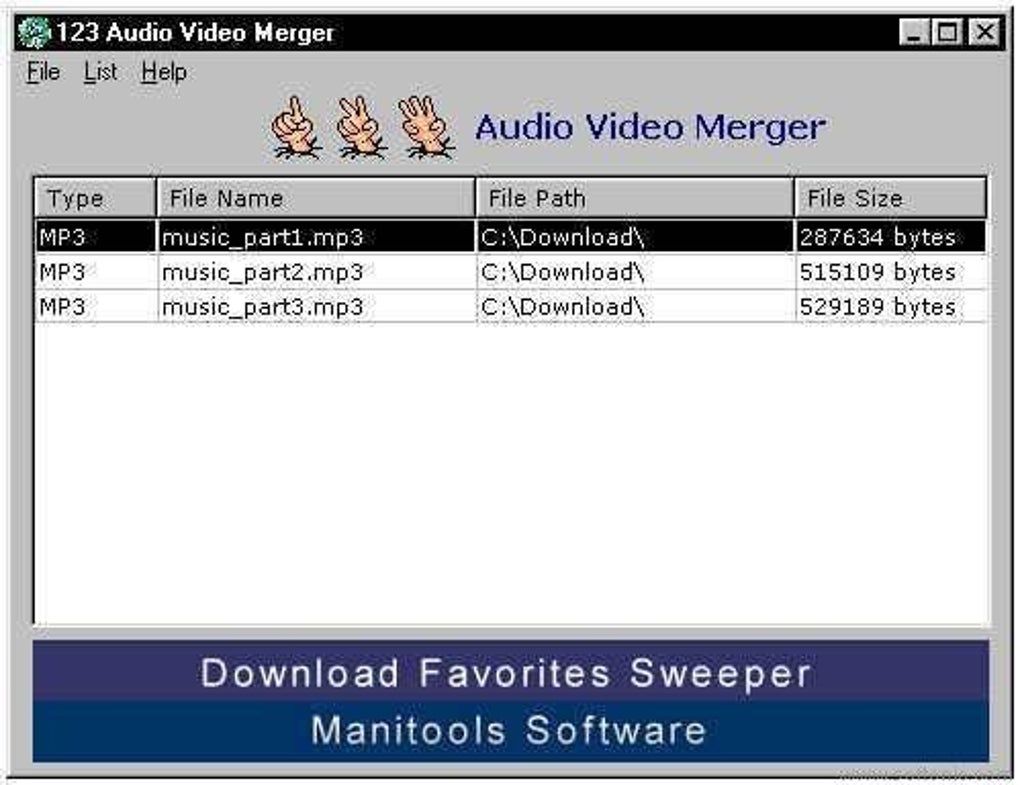
123 Audio Video Merger is a lightweight, free Windows utility designed to combine multiple audio or video files into a single, seamless output. Part of the “Video software” category with the sub‑category “Joiner & Splitters,” this program has been trusted by users across India, Nepal, and Brazil since its inclusion in software directories in 2011. With over 55,000 installations to date, the tool remains popular among users who need a quick, no‑frills solution for merging media files without the overhead of large, feature‑heavy editors. The current version, 1.00, was last updated on June 29 2011 and supports Windows operating systems as far back as Windows 95, making it an excellent choice for legacy machines or older workstations that cannot run modern, resource‑intensive suites. Its English‑only interface keeps the learning curve shallow—simply add the files you want to join, set the output format, and click “Merge.” Because the application is free, there are no hidden fees, trial periods, or forced upgrades, allowing users to focus on the task at hand: creating a single audio or video file from multiple sources quickly and securely.
Key Features That Set It Apart
- Simple drag‑and‑drop interface for adding multiple audio or video tracks.
- Supports popular formats such as MP3, WAV, AVI, MP4, and WMV without additional codecs.
- Batch merging capability – combine dozens of files in one operation.
- Lightweight installer (under 5 MB) and minimal RAM usage, ideal for older PCs.
- Lossless merging option to preserve original quality.
- Automatic file naming based on source order or custom naming patterns.
- Built‑in preview window to verify the sequence before finalizing.
- Free, with no registration, ads, or hidden costs.
While many modern media editors offer merging as a side feature, 123 Audio Video Merger focuses exclusively on that task, eliminating distractions and reducing the chance of accidental edits. The program also includes a basic “smart‑detect” algorithm that aligns audio tracks based on silence gaps, helping to create smoother transitions without manual trimming. For users who need quick results—such as podcasters stitching together interview segments or video creators compiling clips for a highlight reel—this tool provides a reliable, no‑nonsense workflow. Moreover, the application runs entirely offline, ensuring that your media files never leave your computer, which adds an extra layer of security for sensitive recordings.
Installation, Usage & Compatibility
Step‑by‑Step Installation
Installing 123 Audio Video Merger is straightforward. Download the installer from the official site or a trusted mirror, then follow these steps:
- Double‑click the downloaded
.exefile. - Accept the license agreement and click “Next.”
- Choose the destination folder (the default path works for most users).
- Click “Install” and wait for the progress bar to complete.
- Launch the application from the desktop shortcut or the Start menu.
How to Merge Files
Once the program is open, merging files takes just a few clicks:
- Add files: Click the “Add” button or drag files directly into the list window.
- Arrange order: Use the “Up” and “Down” arrows to set the correct sequence.
- Select output format: Choose MP3, MP4, AVI, or other supported formats from the dropdown.
- Set output destination: Browse to the folder where you want the merged file saved.
- Merge: Press the “Merge” button and wait for the progress indicator to finish.
The software automatically creates a temporary working file during the process, which is deleted after the merge completes, keeping your drive tidy. If you encounter any errors, the log window provides a clear description, helping you troubleshoot issues such as unsupported codecs or corrupted source files.
Operating System Compatibility
123 Audio Video Merger runs on Windows 95, Windows 98, Windows ME, Windows 2000, Windows XP, and later Windows versions up to Windows 10. Because the program is built on legacy Win32 APIs, it does not require .NET Framework or Visual C++ Redistributables, which further reduces potential compatibility problems on older machines. Users on modern Windows 10 or 11 can still run the application in compatibility mode if needed, ensuring broad accessibility across a wide range of hardware.
Pros, Cons & User Feedback
Pros
- Extremely lightweight – consumes minimal disk space and RAM.
- Free with no hidden fees or subscription model.
- Supports a wide range of common audio and video formats out of the box.
- Simple, intuitive UI that requires virtually no learning curve.
- Works on very old Windows versions, making it ideal for legacy PCs.
- Offline operation guarantees privacy for sensitive media.
Cons
- Lacks advanced editing tools such as transition effects or audio normalization.
- No native support for macOS, Linux, Android, or iOS platforms.
- Interface looks dated compared to modern 4K‑ready editors.
- Last official update was in 2011, so newer codecs may not be recognized.
- No built‑in cloud integration for sharing merged files directly.
Overall, user reviews highlight the program’s reliability for straightforward merging tasks, while acknowledging that power users may outgrow its feature set. The balance of simplicity and functionality makes it a solid choice for occasional users, educators, and small businesses that need a quick solution without the expense of professional suites.
Review Summary: A dependable, free tool that excels at what it promises – merging audio and video files quickly and securely, though it could benefit from a modern UI refresh and expanded codec support.
Frequently Asked Questions
Can I merge video files of different formats (e.g., MP4 and AVI) together?
Yes. The program will automatically convert the input files to the selected output format before merging, allowing you to combine MP4, AVI, WMV, and other common video types in a single file.
Is 123 Audio Video Merger safe to download from third‑party sites?
For best security, always download the installer from the official website or a reputable software repository. The program is free of adware and does not collect personal data during installation.
Can I use the tool on Windows 11?
Yes. Although the software was originally built for Windows 95‑10, it runs smoothly on Windows 11 when launched in compatibility mode (Windows 10). No additional patches are required.
Does the program support batch merging of more than 20 files?
Absolutely. Users can add an unlimited number of files to the queue; the only limitation is the available disk space for the temporary working file and the final merged output.
Is there any way to add fade‑in/fade‑out effects during merging?
No. The current version focuses on straightforward merging and does not include transition effects. For advanced editing, consider using a dedicated video editor after the merge is complete.
Conclusion & Call to Action
123 Audio Video Merger remains a solid, free utility for anyone who needs to combine audio or video clips quickly without the bloat of full‑scale editing suites. Its lightweight footprint, support for legacy Windows versions, and simple drag‑and‑drop workflow make it especially attractive for users on older hardware or for those who value privacy and offline operation. While it lacks modern UI polish and advanced editing features, the core purpose—fast, reliable merging—gets the job done. If you’re looking for a no‑cost, secure solution to stitch together podcasts, lecture recordings, or video highlights, give 123 Audio Video Merger a try today.
Download 123 Audio Video Merger now and start merging your media files in seconds.







